5 Things to Check Before You Rent Any Gear
A quick pre-rental checklist that saves you from surprise fees, no-shows, and gear that shows up in worse shape than the photos.


Most rentals go fine. The owner shows up, the gear works, you finish the project and bring it back. The ones that go sideways almost always trace back to something nobody checked: a price that was per hour, not per day, a pickup spot across town, a scratch nobody photographed.
Five minutes before you send a request fixes most of that. Here's the checklist we'd run on every rental, whether it's a pressure washer for a Saturday or a kayak for a week.
1. Read the Whole Listing, Not Just the Price
The price is the first thing you see and the last thing that should decide it. Scroll down.
- Check the unit. Every GoatRent listing has one price and one unit: per hour, day, week or month. A $25 tile saw is a very different deal per hour than per day.
- Look for a minimum rental. Owners can set one, so a trailer might need two days at least. Better to know before you plan a one-day job around it.
- See what's in the box. Photos and specs tell you what comes with it. Extras like a spare battery or a second blade are often listed as add-ons with their own price.
- Look for a deposit. If the owner asks for a security deposit, it shows up with the price and goes into the rental agreement.
Photos matter most. Owners photograph their own item, so zoom in. Wear, missing parts and the general state of things are usually right there if you look.
2. Pick the Handover That Works for You
How the gear gets to you changes the price and your Saturday. Depending on the listing, you'll see some of these options:
- Pickup from the owner
- Meet in a public place
- Owner delivery
- Third-party delivery
Delivery options can carry a fee. It shows as its own line in the price before you send the request, so there's no surprise later.
The map shows the item's area, not the exact spot. You get the exact address once the owner approves. Owners can offer a time window, and for pickups and meet-ups you pick the exact time inside it. Think about the return trip too. It's the same distance twice.
3. Look at Who You're Renting From
You're borrowing from a person, not a store, so spend a minute on their profile.
- The Verified badge. Members can verify their identity through Stripe with a government-issued ID. It's optional, but it shows the person behind the profile is real.
- The rating and the count. Ratings show the average and how many reviews it's based on. "5.0 (1)" and "4.8 (40)" tell very different stories.
- The reviews themselves. Look for patterns like "exactly as described", "easy handover" or "flexible on pickup". They say more than the stars.
GoatRent has no chat. If something isn't clear, ask it in the note on your request. The owner sees it before approving, and you can edit it while the request is still pending.
4. Know the Paperwork and the Money Before You Meet
Every request comes with a PDF rental agreement covering the item, its condition, the dates, the price and any deposit. You can preview it while you put the request together and download it from the request page at any time. It becomes final when you sign at check-in. Read it once. It also says that the item is your responsibility from check-in until check-out.
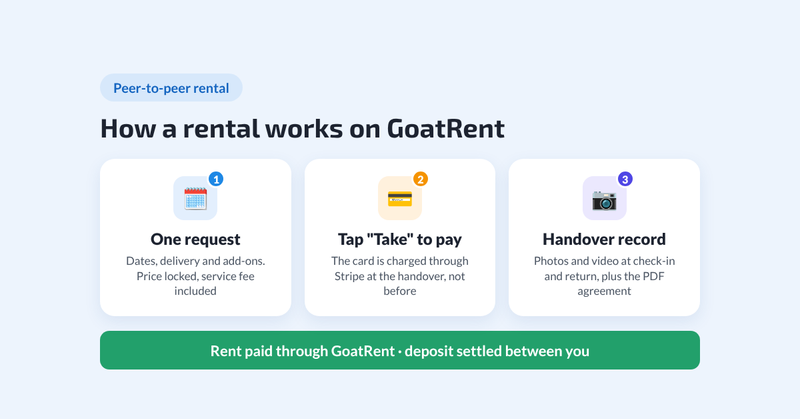
Then the money. Rentals are paid through GoatRent, and Stripe processes the payment. You save a card on Stripe's secure page, and it's charged only when you tap "Take" at the handover, once you've seen the item. What you pay is the total you saw before you sent the request: the owner's price plus one service fee. A security deposit, if the owner asks for one, isn't paid through GoatRent, so agree with the owner how you'll settle it at the handover.
Plans change, and that's fine. You can cancel a request at any point before you take the item, and it costs nothing: your card isn't charged until you tap "Take".
5. Record the Condition at Handover, and Again at Return
This is the step people skip, and the one they wish they hadn't.
At check-in, look the item over with the owner and give it a quick test. Then add your note, photos (up to five) and a video to the request. The owner can do the same, so you both end up with one timestamped record of how the gear went out.
Do it again at return. A few photos at check-out show it came back in the same shape. Remembered something later? You can still add to the return record for 24 hours after the rental is marked complete.
GoatRent doesn't settle disputes between members. That's why the record matters: if a question ever comes up, you and the owner are looking at the same facts.
The Five-Minute Checklist
Before you send the request:
- Price and unit, minimum rental, add-ons, deposit
- A handover option that fits your schedule, plus the return trip
- Verified badge, rating, number of reviews, a few actual reviews
- Questions in the request note, not left for the driveway
At the handover:
- Agreement read, payment method agreed
- Item tested, condition photographed at check-in
- Same again at check-out
Final Thoughts
None of this takes long, and it turns "hope this works out" into "I know exactly what I'm getting." Want to see how a rental runs from start to finish? Read the complete rental journey on GoatRent, then how GoatRent keeps renting safe and transparent. Happy renting.